

What Makes awaBerry Secure?
Security Architecture — for IT Administrators, Security Officers & Developers.
Security Philosophy
Zero Trust. Least Privilege. Local Execution.
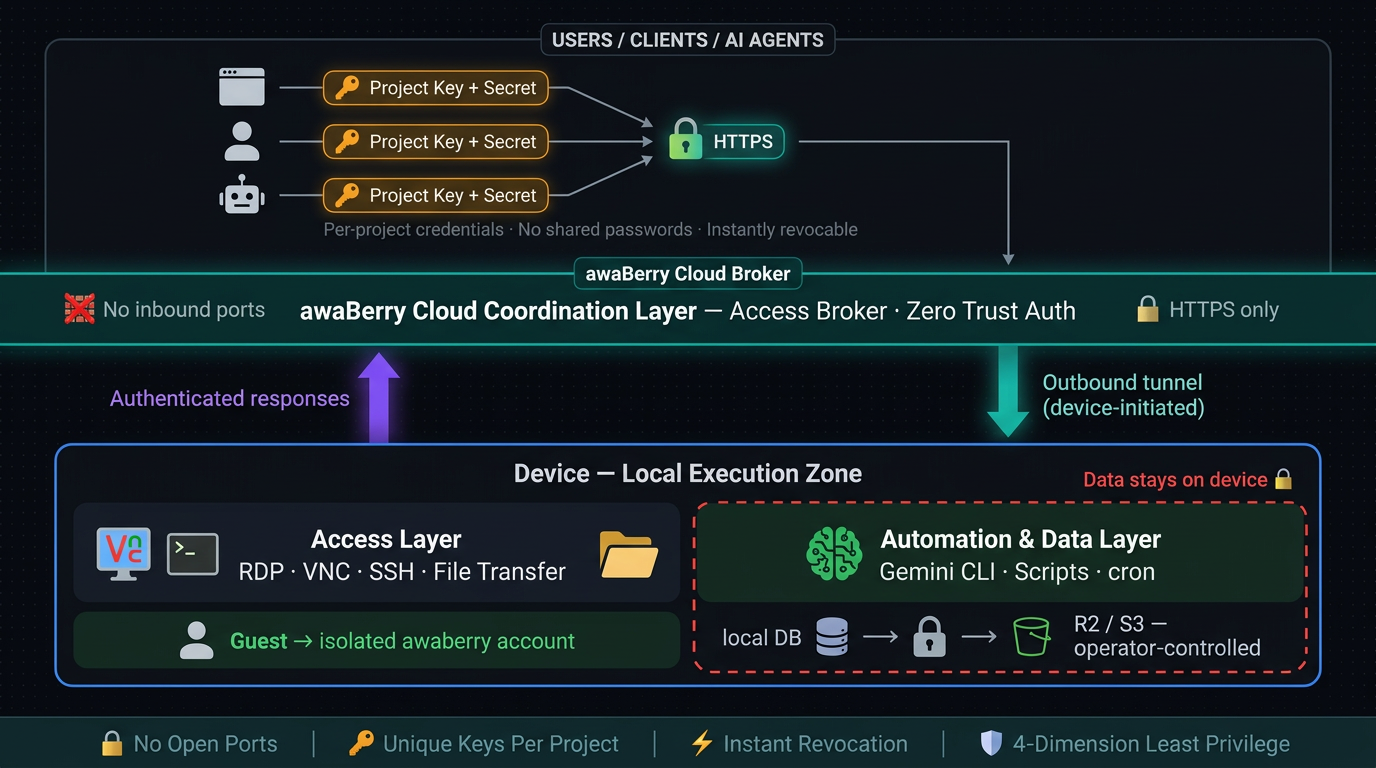
awaBerry is built on three non-negotiable security principles that apply across all three products. Security is not a layer added on top of functionality — it is the foundation the platform is built on.
Zero Trust
No device, user, or script is trusted by default. Every access request is authenticated and authorised explicitly, every time — regardless of network location or prior access history.
Least Privilege
Every access grant defines the minimum scope required. Broader access must be deliberately configured, not inherited. No access exists outside of an active project — no standing credentials, no background sessions.
Local Execution
Automation logic and data processing run on the registered device. Data does not transit the awaBerry cloud infrastructure unless explicitly routed there by the operator. Sensitive data stays where it belongs.
For IT Administrators
Operational Security Controls
No VPN, No Open Ports — Ever
The awaBerry agent on each device establishes an outbound HTTPS tunnel to the cloud coordination layer. This is the only network connection involved. No firewall rules need to be created or modified. No public IP address is assigned to or exposed by any registered device. Devices behind NAT, mobile data connections, or strict enterprise firewalls are fully supported — network administrators observing traffic see standard outbound HTTPS.
Credential Architecture — No Shared Credentials
Shared root SSH keys, standing VPN credentials, and shared admin passwords are all replaced by per-project API keys. Each project has unique, independent credentials. Revocation is total and immediate — deleting a project terminates all active sessions, invalidates the credentials, and leaves zero residual access. No user account to clean up. No SSH key to rotate. No firewall rule to reverse.
Fleet Access Control
The Agentic API allows a single project to target multiple devices simultaneously, enabling fleet-wide automation without creating per-device credentials. Each project still enforces the same permission constraints on every device it targets — one configuration, uniformly applied.
For Security Officers
Access Control & Compliance Architecture
Every Agentic API project enforces access control across four independent dimensions. No dimension inherits from another. Each must be explicitly configured — broader access is always an explicit opt-in, never a default.
Privilege Level
Restrictive (default): Standard awaberry user — unprivileged, isolated account with no access to other accounts or core system directories.
Permissive (explicit opt-in): Administrator / root access — must be deliberately configured per project.
Filesystem & Write Access
Restrictive (default): Named absolute paths only — the project can only access directories explicitly listed at creation.
Permissive (explicit opt-in): All folders, with write access and subfolder creation enabled per path.
Command Execution
Restrictive (default): Strict allowlist of permitted commands — the agent will only execute commands matching the list exactly.
Permissive (explicit opt-in): All commands allowed — suitable only for trusted internal automation.
Read-Only Audit Access
Create a project scoped to /var/log/ and /etc/app/ with no write access and a command allowlist of read-only tools (cat, grep, tail). Share the key. Delete the project when the audit concludes — zero residual artifacts.
Incident Response — Forensic Access
Grant a SOC analyst read access to logs, process data, and network status (ps aux, netstat -tulnp, cat /var/log/auth.log). Destructive commands are structurally excluded from the allowlist. Delete on investigation close.
Certificate Rotation Without Shared Root
A dedicated project with a narrow command allowlist (systemctl reload nginx, certbot renew) and the certificate directory in scope handles full TLS rotation fleet-wide — no root credential ever leaves your control.
Contractor Access Without VPN Onboarding
Generate a Project Key. Share it via the built-in email draft feature. Delete the project when the work is done. Total provisioning time: under two minutes. Total cleanup time: one click.
Automated backup pipelines generated by the Smart Automation Platform include three layers of data security:
Integrity Validation
Row-count checks verify the backup is complete before proceeding. A corrupt or empty dump aborts the pipeline and fires an alert — it is never silently uploaded.
GPG Encryption
Backup files are encrypted with operator-managed GPG keys before cloud upload. The awaBerry platform never holds encryption keys.
Operator-Controlled Storage
Encrypted archives are uploaded to Cloudflare R2 or S3-compatible buckets owned and managed by the operator. awaBerry does not store or access backup data.
For Developers
Security in the Development Workflow
Local Execution — Data Stays on the Device
All automation logic executes locally on the registered device. The Gemini CLI runs on the device. Generated scripts run on the device. Data processed by automation pipelines does not transit the awaBerry cloud infrastructure — it goes only where the script explicitly sends it (a local file, a database, a REST endpoint, a cloud bucket). Sensitive data — invoices, healthcare records, credentials, proprietary datasets — is processed locally and never exposed to a third-party automation platform.
Scoped AI Agent Access
When AI agents access devices via the Agentic API as an MCP server, the same permission model applies as for any other access project. Agents authenticate with a Project Key — they receive no broader access than any other project. Filesystem access is scoped to explicitly defined directories. Command execution is limited to the project allowlist. The agent's access is revocable independently of any other integration in your stack.
Dependency and Script Transparency
The Setup phase generates scripts using standard, well-known libraries (playwright, pdfplumber, hl7apy, feedparser, rclone). Generated scripts are stored locally, human-readable, and auditable. Developers can inspect, modify, and version-control them. There is no proprietary binary or obfuscated execution layer between the generated script and the OS.
Summary
Security Properties at a Glance
No Inbound Ports
Device agent uses outbound-only HTTPS tunnel — no firewall rules ever touched.
No VPN Required
All access flows through the awaBerry access broker over standard HTTPS.
No Shared Credentials
Every project has unique, independently revocable keys — no shared root, no shared VPN, no shared passwords.
Least Privilege Enforced
Four-dimension permission model — privilege, filesystem, write access, command scope — configured per project, enforced at every execution.
Instant Revocation
Delete project = immediate termination of all access. Zero residual artifacts. No cleanup required.
Guest Isolation
External users land in the sandboxed awaberry account — no access to other accounts or core system directories.
Encrypted In Transit
All tunnel traffic is HTTPS end-to-end. All backup archives are GPG-encrypted with operator-managed keys before upload.
Local Data Processing
Automation executes on device — data does not transit awaBerry. Scripts are human-readable, stored locally, and fully auditable.
Conclusion
Security by Architecture, Not by Addition.
awaBerry's security model is not a layer added on top of functionality — it is the foundation the platform is built on. The outbound-only tunnel eliminates the most common remote access attack surface. The project-based permission model makes least privilege the default, not the exception. Instant revocation makes time-limited access operationally practical. And local execution ensures that sensitive data never has to leave the machine it belongs on.