

How Does awaBerry Work?
Architecture & Execution Model — for IT Administrators, Security Officers & Developers.
System Architecture
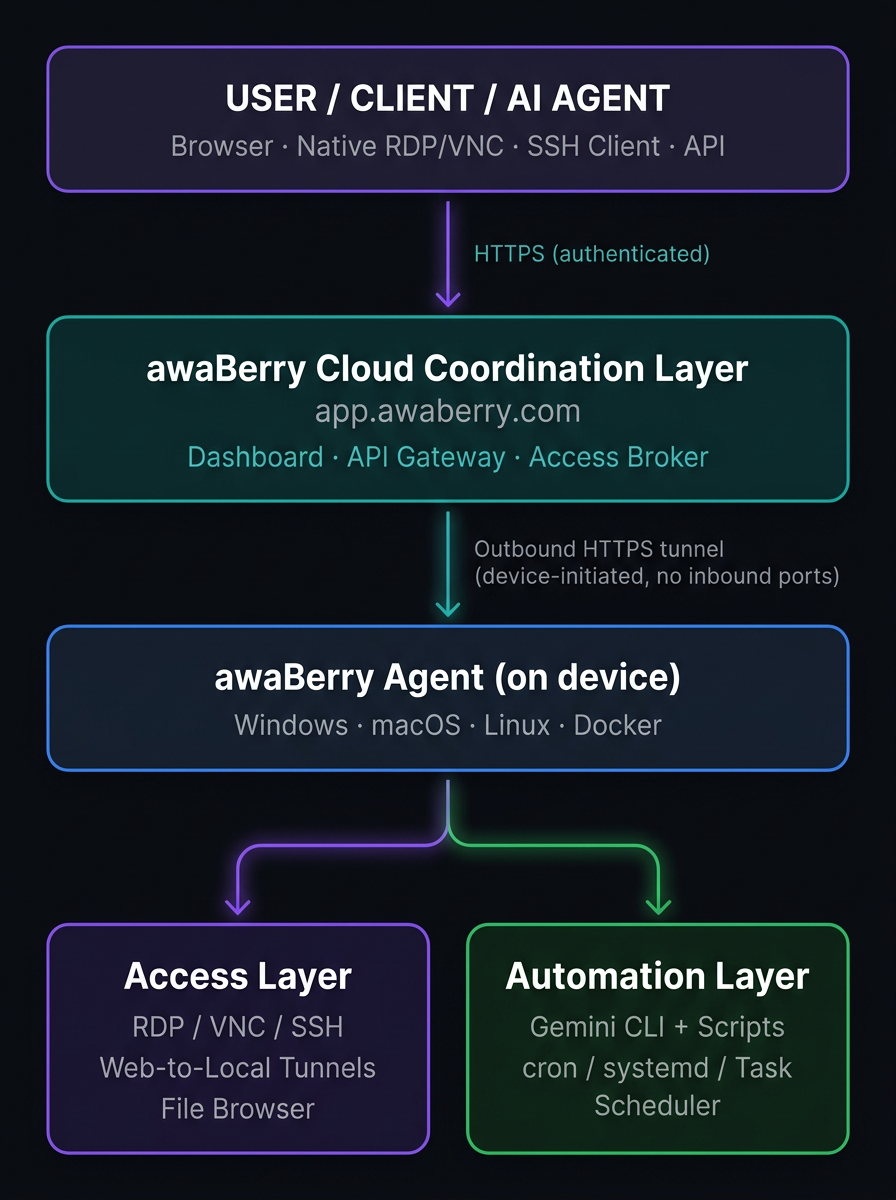
The Three-Layer Model
awaBerry operates as a three-layer system. The device agent always initiates the connection outbound to the cloud layer — no inbound ports are ever opened, and no device is reachable by anything that has not been authenticated through the awaBerry access broker.
Cloud Coordination Layer
Brokers all connections and stores configuration. Authenticates every access request. Acts as the central control plane for device registry, project config, access keys, and execution logs.
Lightweight Device Agent
Runs on each registered machine as a background service. Establishes an outbound HTTPS tunnel to the cloud layer — never opening inbound ports. Executes access requests scoped by the active project permissions.
Local Execution Environments
Carry out automation and access requests directly on the device. Automation scripts, data processing, and AI-generated pipelines all run locally — data does not transit awaBerry infrastructure unless explicitly routed there.
Part 1: awaBerry Anywhere
How Remote Access Works
Three deployment paths cover every infrastructure scenario. Each onboarding path produces a registered device entry in the dashboard with a unique device identity and encrypted tunnel credentials.
Bespoke Installer
Best for: Bare metal, SoC, custom hardware.
Custom-built installer generated per device — flash to USB/SD or deploy directly.
Docker Container
Best for: Containerized stacks, NAS, servers.
docker run with the awaBerry image — no host OS modification required.
Guided Single-Click Init
Best for: Existing running machines.
One-click initialization flow from the dashboard — no media creation, no manual config.
Once registered, every session type follows the same three-step pattern:
1. Activate
Select the desired access method in the awaBerry web portal — RDP, VNC, SSH, Web-to-Local, or File Browser. The session is activated on demand; no standing connections persist.
2. Connect
Connect via browser (SSH, Web-to-Local, in-browser VNC) or native client (RDP, VNC with Apple Screen Sharing / RealVNC / Remmina). No VPN client, no port configuration.
3. Session Traffic
All traffic flows through the encrypted tunnel — never directly between client and device. Web-to-Local Tunnels map a local port on the registered device (e.g., a router admin panel) to a secure tunnel URL — live immediately, without any firewall modification.
Part 2: Smart Automation Platform
How Automation Works
The core architectural decision of the Smart Automation Platform is a strict separation between creating automation logic and running it. This separation drives both reliability and cost efficiency.
Setup Phase (once)
A plain-English prompt is processed by Gemini Pro (reasoning model) running locally via the Gemini CLI on the device. The AI analyses the environment, explores installed runtimes and file paths, writes a production-ready script (Node.js, Python, or Bash), installs required dependencies, and validates execution — all in a single setup run.
Token cost: 7,000–18,000 tokens, one time.
Execution Phase (repeatedly)
The generated script is stored locally on the device and scheduled via cron, systemd, or Windows Task Scheduler. Every subsequent run executes the standalone, deterministic script — no AI is involved, no tokens are consumed.
Optionally, Gemini Flash Lite can summarise execution output (~100–500 tokens per run).
Supported Automation Domains
Web scraping & browser automation (Playwright, Puppeteer), document processing (pdfplumber, pdf-parse), legacy UI automation (pyautogui), log monitoring, database operations (pg_dump, SQLite, rclone, GPG), API & data pipelines (feedparser, arxiv, SMTP), healthcare data (hl7apy, fhirclient), and file system watching (inotify, fs.watch).
Part 3: awaBerry Agentic API
How Programmatic Access Works
Every access grant — whether for an automated script, an AI agent, or a human user — is modelled as an Agentic API Project. A project defines target devices, access mode (Programmatic or Shared User), privilege level, filesystem scope, and command scope. On creation, the platform generates a unique Project Key and Project Secret.
Programmatic Access Flow
A script, AI agent, or CI pipeline sends a POST request to /api/v1/execute with Project Key + Secret and a body containing the command, target device, and any input files. The awaBerry API Gateway validates credentials, checks the command against the allowlist, and checks the path against the folder ACL before forwarding to the device agent. The agent executes in a scoped context and returns stdout, stderr, and exit_code.
MCP Server Integration
The Agentic API exposes a Model Context Protocol (MCP) server interface, allowing AI orchestration frameworks (Claude, Gemini, custom agents) to register awaBerry as a tool provider. AI agents can list registered devices, execute permitted commands, read from and write to scoped directories, and chain calls across multiple machines in a pipeline.
Shared Device Access
For human users (support engineers, auditors, collaborators): create a project with Shared Device Access mode, toggle optional capabilities (Remote Desktop, Web-to-Local port activation), share the Project Key and Secret (built-in email draft available). The user connects to the isolated awaberry account. Access is terminated by deleting the project — immediate, complete, no cleanup required.
What to Operate & Audit
For IT, Security & Development Teams
IT Administrators
Web dashboard (app.awaberry.com): device registry, project config, access keys, execution logs.
awaBerry agent: install once per device; runs as a background service.
Automation scripts: generated at setup; scheduled via OS task scheduler — no ongoing maintenance.
Gemini CLI: installed once per device running automation; used only during setup phases.
Security Officers
All access projects are visible in the dashboard with their full permission configuration.
Execution logs are retained per automation run.
Project Keys can be enumerated, reviewed, and revoked from a single control plane.
No access exists outside of an active project — there are no standing credentials or background sessions.
Developers
Agentic API: standard HTTPS REST — integrate from any language or CI/CD pipeline.
MCP server: compatible with Claude, Gemini, and custom agentic frameworks.
Docker deployment: standard container, composable into existing stacks.
Automation output: filesystem, webhooks, SMTP, REST endpoints — any destination your workflow requires.
Summary
Simple at the Boundary. Powerful Under the Hood.
awaBerry's architecture is deliberately simple at the integration boundary — HTTPS REST, standard native clients, plain-English prompts — while handling the hard problems internally: outbound-only tunneling, AI-driven script generation, granular permission enforcement, and fleet-level orchestration. Every component runs where it should: control in the cloud, execution on the device, data nowhere it was not explicitly sent.